Fix PCs Wiki Overview
Unofficial fan overview of the Roblox PC repair shop — systems, hubs, and where to click next.
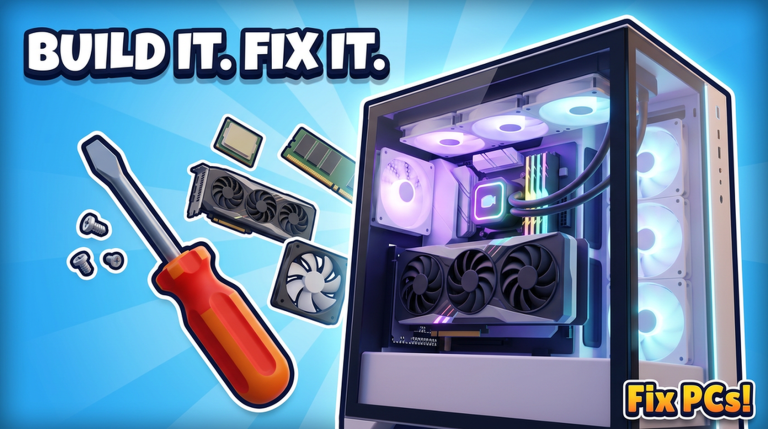
Welcome to the unofficial Fix PCs wiki — a structured guide for Fix PCs! on Roblox by DEVTEC STUDIOS. This overview summarizes the game loop, lists hard facts we keep consistent across articles, and links every major hub so you never have to guess where codes, tiers, or repair checklists live.
Play the experience: Fix PCs! on Roblox.
Game summary
Fix PCs! is a simulation / tycoon PC repair shop. Customers walk in with broken computers. You figure out what failed, open the machine on your workbench, swap dead parts, drive screws, plug cables, power on, run a benchmark, and collect payment. Between tickets you order parts, unpack deliveries, decorate the unit, hang a 3D name on the shopfront, hire staff, open new floors, take contracts, and watch weather move down the street.
Signature systems:
- Roughly 192 parts — GPUs, CPUs, motherboards, RAM, liquid coolers, fans, cases
- Custom PCs, dual-GPU workstations, and server racks
- Dust blowouts, case repaints, bent CPU pin straightening, virus cleaning
- Server size 6 for co-op or shared public shops
Released 22 October 2026, with an early refresh window around 11 November 2026. Live visit/favorite counts move on Roblox; community snapshots cited elsewhere on the wiki are approximate (~323k visits / ~14k favorites at research time).
Quick facts
| Fact | Detail |
|---|---|
| Title | Fix PCs! (wiki short name: Fix PCs) |
| Platform | Roblox |
| Developer | DEVTEC STUDIOS |
| Place URL | https://www.roblox.com/games/100632832332148/Fix-PCs |
| Universe | 10772400342 |
| Release | 2026-10-22 |
| Tracked update | 2026-11-11 |
| Genre | Simulation / tycoon PC repair |
| Server size | 6 |
Hub directory
Progression & how-to
- Guides Hub — walkthrough index
- Getting Started — first-session onboarding
- How to Repair — diagnose → bench → pay
- Build Custom PCs — customs, dual-GPU, racks
Parts & planning
- Tier List Hub — repair vs build ranking philosophy
- GPU & CPU tiers — silicon and boards
- Cooling & Cases — thermals, fans, paint, chassis
Player utilities
- Tools Hub — practical helpers
- Repair Checklist — bench-side diagnose list
Meta & community
- Codes Hub — honest promo tracking (no invented codes)
- Scripts Hub — account-risk disclaimer; no verified cheat list
- Players Hub — group, Discord safety, co-op etiquette
- Updates Hub — launch and patch reading guide
How to use this wiki efficiently
- New tech: Read Getting Started, then run the Repair Checklist on your first three tickets.
- Broke after buying fancy GPUs: Study early-shop tiers — RAM and fans often beat trophy cards.
- Chasing free rewards: Codes Hub only — never password forms.
- Building for contracts: GPU/CPU page + Cooling & Cases + Build Custom PCs.
- After a patch: Updates Hub first, then re-check tiers if parts changed.
- Playing with friends: Players Hub etiquette for six-person servers.
Internal links across articles use trailing slashes and stay inside the same language version of the site. Legal pages (/terms/, /privacy/, /cookies/) remain English-only shared URLs.
Editorial rules (so you know what “confirmed” means)
- We do not invent promo codes or YouTube video IDs.
- We do not host executors or claim “safe scripts.”
- We keep release dates, universe id, and server size aligned with
content/facts.jsonstyle sourcing. - Fan wiki ≠ official manual — when Roblox text and this page disagree, trust the live experience and DEVTEC STUDIOS posts, then tell us to update.
Related starting links
If you only open four pages today: Getting Started, Codes, Tier List, and Repair Checklist. Everything else elaborates those four jobs — learn the loop, watch for gifts, stock the right parts, and finish benchmarks before you celebrate.
Enjoy the shop floor. Keep the screws. Pass the benchmark.
Frequently Asked Questions
Quick answers to the most common questions.
Is this the official Fix PCs wiki?
No. This is an unofficial fan resource. Game marks belong to their owners; we are not affiliated with DEVTEC STUDIOS or Roblox.
What is Fix PCs about?
You run a Roblox PC repair shop: diagnose broken computers, swap parts on a workbench, pass benchmarks for pay, then expand with staff, floors, contracts, and décor.
Where should beginners start?
Open Getting Started, then How to Repair and the Repair Checklist. Use the Tier List Hub once you are stocking parts intentionally.
Does the wiki list working codes and scripts?
Codes are listed only when confirmed — the Codes Hub stays honest if none exist. The Scripts Hub explains risks and does not provide verified cheats.
How big are Fix PCs servers?
Server size is 6. See the Players Hub for co-op etiquette.
When did the game launch?
22 October 2026, with an early update checkpoint around 11 November 2026 documented on the Updates Hub.